Blink Video Doorbell Review: Worth It in 2026?
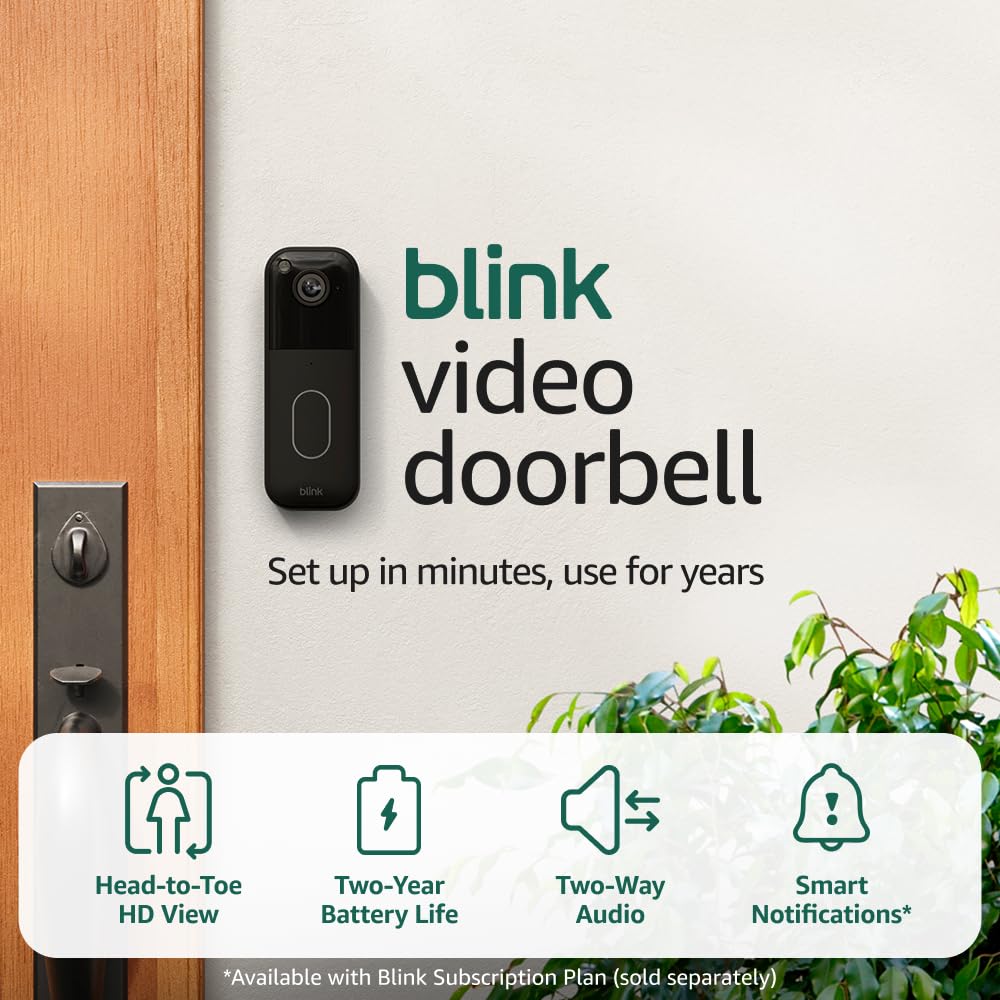
Blink Video Doorbell + Required Sync Module: my honest take
If you’re shopping for a video doorbell, you’re probably trying to solve one (or more) very real problems: package theft, not hearing the doorbell from the back of the house, wanting to see who’s at the door before you open it, or keeping an eye on deliveries while you’re away. Blink’s Video Doorbell is popular because it promises those basics at a price that’s usually much lower than Ring, Google Nest, or Eufy.
This specific bundle/listing is important because it includes (and emphasizes) the Sync Module requirement. In the Blink ecosystem, the Sync Module isn’t just a “nice-to-have”—it’s often the difference between a smooth experience and a frustrating one, especially if you plan to add more Blink cameras later or you want the best battery life and reliability Blink can offer.
In this review, I’ll walk you through what the Blink Video Doorbell does well, where it falls short, and—most importantly—who it’s actually a smart buy for. I’ll also give you buying advice so you don’t end up paying more than you expected once you factor in storage and subscriptions.
🛒 Check Current Price on Amazon →
What you’re really buying (and why the Sync Module matters)
At a high level, the Blink Video Doorbell is a battery-powered (or wired) doorbell camera that sends motion alerts and doorbell press notifications to your phone, lets you speak to visitors with two-way audio, and integrates with Alexa for announcements and smart home routines.
But Blink’s system is designed around a hub-like device called the Blink Sync Module. Depending on your setup and which Blink features you care about, the Sync Module can matter for a few reasons:
- System stability and range: The doorbell connects to Wi‑Fi, but Blink’s ecosystem is optimized when devices are paired through a Sync Module. In real homes with average routers and typical Wi‑Fi dead spots, that can improve consistency.
- Local storage options: With a Sync Module that supports it, Blink can save clips to a USB drive (instead of only cloud). This is a big deal if you want to avoid ongoing fees. (Exact behavior varies by Blink plan and hardware generation, but the Sync Module is the gateway to any “local-ish” storage approach in Blink.)
- Battery life and performance tuning: Blink’s brand reputation is built on long battery life. The Sync Module is part of how Blink keeps devices efficient and responsive.
If you’re only buying a single doorbell and you already know you want cloud recording, you might be tempted to skip the Sync Module. In my experience, that’s where people end up regretting the purchase later—either because they add a second Blink camera, decide they want local storage, or start troubleshooting inconsistent alerts and realize the hub would have helped.
Setup and installation: easier than most, but plan your power choice first
One of the best things about the Blink Video Doorbell is that it’s approachable for non-technical households. If you can install a standard doorbell or mount a small device with screws, you can install this.
Battery vs. wired: Blink gives you flexibility. Battery power is the easiest (no wiring, no transformer concerns), but wired can reduce maintenance and can improve the “always ready” feeling—especially in cold climates where batteries drain faster. If your current doorbell wiring is in good shape and you have a compatible transformer, wiring is usually worth it for peace of mind. If you rent, or your wiring is old/unknown, battery is the safer path.
App onboarding: Blink’s app experience is generally straightforward: add device, scan code, connect to Wi‑Fi, and then pair to the Sync Module. The biggest setup mistakes I see are (1) mounting the doorbell before confirming Wi‑Fi signal strength at the door, and (2) choosing motion settings that are way too sensitive, leading to notification fatigue.
My practical advice: Before you drill anything, hold the doorbell where it will live and run through setup. Trigger test motion events. Make sure you get alerts quickly. Only then mount it permanently.
Video quality: good enough for the price, with realistic expectations
Blink’s Video Doorbell is not trying to be the “best image quality on the market” option. It’s trying to be the best value option for basic door monitoring. In that lane, it does a solid job.
Daytime video: In good lighting, the doorbell typically delivers a clear view of visitors at the door. You’ll usually be able to identify faces at normal doorstep distance and see package drop-offs. Where it can struggle is high-contrast scenes (bright sun behind a person, deep shadows on a covered porch). If your front door faces direct afternoon sun, expect some blown highlights and occasional difficulty seeing facial details.
Night vision: Blink’s infrared night vision is workable for close-range viewing—think “who is at the door?” more than “read a license plate from the sidewalk.” If you have porch lighting, keep it on; you’ll get more natural detail and fewer grainy IR artifacts.
Field of view and framing: The most important “video quality” factor for doorbells is actually framing. If your doorbell is mounted too high, you’ll see hats and foreheads. Too low, and you’ll get a lot of chests and packages but miss faces. Take the time to mount at a sensible height and angle. If you need to see packages on the ground, consider a slight downward tilt.
Latency and clip start timing: Like many battery-focused doorbells, Blink may not always capture the first fraction of a second of motion if someone walks quickly into frame. This is the trade-off of maximizing battery life and using motion-triggered recording. If you need “every frame, all the time,” you’re shopping in a different category (and a different price tier).
Motion detection and alerts: the make-or-break part of the experience
For most people, the best doorbell camera is the one that alerts reliably without driving you crazy. Blink’s motion detection can be very good once tuned, but it often needs tuning.
Sensitivity and zones: If your door faces a sidewalk, street, or a busy shared walkway, you’ll want to reduce sensitivity and use motion zones to avoid constant triggers. If your porch is quiet, you can increase sensitivity to catch smaller movements like a delivery person approaching from an angle.
Notification speed: Blink’s alerts are typically fast enough for “someone is at the door” awareness, but you should expect some variability based on Wi‑Fi strength, phone settings (battery optimization can delay notifications), and how aggressively you’ve set clip length and retrigger time. If you want the most responsive behavior, keep the Sync Module in a strong signal location and ensure your router isn’t struggling at the edge of coverage.
False alerts: Wind-blown plants, shadows, headlights, and reflective surfaces can all trigger motion. I recommend doing a one-week “tuning period” where you adjust settings a bit each day. Once dialed in, Blink can be pleasantly calm compared to some overly sensitive systems.
Two-way audio and doorbell function: solid, not premium
Two-way talk is one of those features that sounds simple but is surprisingly hard to do perfectly. With Blink, I’d describe it as reliable enough for quick interactions—“Leave the package by the mat,” “I’ll be right there,” “No thanks.”
Audio clarity: In quiet conditions, voices are understandable. In noisy conditions (busy street, wind, rain), you may need to speak clearly and keep phrases short. This is normal for doorbell cams in this price bracket.
Talk latency: Expect a slight delay. If you’re used to a phone call feel, doorbell talk can feel a beat behind. My recommendation is to pause half a second after you hit talk, then speak.
Traditional chime integration: If you’re wiring it to existing doorbell wiring, you may be able to integrate with your existing chime depending on your home’s setup. If you’re running battery-only, you’ll rely on phone alerts and Alexa announcements (or a compatible indoor accessory if you use one). For many households, Alexa announcements are the easiest “whole home chime” solution.
Alexa and smart home integration: where Blink makes the most sense
If you have Echo speakers or an Echo Show, Blink becomes much more compelling. You can get doorbell press announcements, motion announcements (if you want them), and you can pull up the camera feed on an Echo Show.
This is one of the biggest reasons I recommend Blink to budget-minded shoppers: you can build a pretty functional “front door awareness” system without buying into a more expensive ecosystem.
What to expect: Voice announcements are usually quick. Live view on smart displays can take a moment to load, and it’s not always instantaneous. Still, it’s extremely useful in daily life—especially if your phone isn’t always in your hand.
Storage and subscriptions: understand this before you buy
This is the part that determines whether Blink is a bargain or a headache.
Cloud recording (subscription): Blink’s full feature set—especially around clip storage, sharing, and reviewing events—often assumes you’ll use a Blink subscription plan. If you want the simplest experience (open app, scroll timeline, view events), cloud is usually the smoothest path.
Local storage (Sync Module + USB): If avoiding monthly fees is your priority, Blink’s local storage option via the Sync Module can be attractive. But go in with realistic expectations: local storage systems can be less polished than cloud timelines, and performance can depend on the USB drive you use and your network conditions. If you’re comfortable managing a USB drive and you don’t need advanced cloud features, local storage can be a strong value.
My buying advice: Decide now whether you’re okay paying for cloud. If you are, Blink is easy. If you aren’t, make sure you’re buying this doorbell specifically because you’re comfortable with the Sync Module + USB approach and its limitations.
🛒 View on Amazon — See Latest Reviews →
Battery life and real-world maintenance
Blink’s reputation for battery life is one of the main reasons people choose it. In the real world, battery life depends heavily on:
- How busy your front door is (motion events per day)
- Clip length (longer clips drain more)
- Retrigger time (short retrigger = more recordings)
- Temperature (cold weather reduces battery performance)
- Wi‑Fi signal strength (weak signal = more power used)
If you live on a quiet street and you tune motion zones properly, you can get impressively long battery life. If your door faces a busy sidewalk and you want high sensitivity with lots of recordings, you’ll be swapping batteries more often. That’s not Blink-specific—it’s physics.
My practical recommendation: If you want battery power, treat motion tuning as part of “installation.” It’s the difference between “set it and forget it” and “why am I changing batteries again?”
Reliability: Wi‑Fi reality check
Doorbells are often installed at the worst possible place for Wi‑Fi: exterior wall, sometimes brick or stucco, sometimes near metal doors, and often far from the router. If your Wi‑Fi is marginal at the front door, any video doorbell will suffer.
Before blaming the camera, I always recommend checking:
- Router placement (central, elevated, not hidden in a cabinet)
- 2.4 GHz coverage (many smart cams rely on it for range)
- A mesh node near the front of the house if needed
With Blink, placing the Sync Module in a good location can help overall system behavior. But it can’t fix truly poor Wi‑Fi. If your front door is a dead zone, budget for a mesh Wi‑Fi upgrade or a node near the entry.
Everyday usability: what it’s like to live with
Here’s what I think matters most after the novelty wears off:
1) Do you actually notice alerts? Blink’s notifications are generally clear. Pairing with Alexa announcements can be a game-changer if you miss phone notifications.
2) Can you review events quickly? With cloud recording, yes—it’s typically straightforward. With local storage, it can still be good, but it depends on how you’ve set it up and what expectations you have for a “timeline.”
3) Does it reduce anxiety or create it? A doorbell camera should make you feel more in control, not glued to your phone. Proper motion zones and sensitivity settings are key to making Blink feel calm and useful.
Pros and cons
Pros
- Excellent value for basic front-door monitoring compared to many competitors
- Flexible installation (battery or wired)
- Alexa integration is genuinely useful for announcements and quick viewing
- Good enough video quality for identifying visitors and monitoring deliveries
- Sync Module ecosystem makes it easier to expand to more Blink cameras later
Cons
- Subscription/value confusion: the best experience often assumes cloud recording
- Not a “premium” video doorbell: dynamic range and night detail are limited compared to higher-end models
- Battery trade-offs: heavy traffic areas can reduce battery life and miss the earliest moment of motion
- Wi‑Fi dependent: weak signal at the door will cause delayed alerts and slower live view
Who this is best for (and who should skip it)
Buy the Blink Video Doorbell + Sync Module if:
- You want an affordable doorbell camera that covers the basics well
- You already have Amazon Echo/Alexa devices and want doorbell announcements
- You’re okay with motion-triggered recording (not 24/7)
- You want a system you can expand later with additional Blink cameras
- You either don’t mind a subscription or you’re comfortable managing local storage via Sync Module + USB
Consider alternatives if:
- You need the sharpest possible video or superior HDR for harsh lighting
- You want 24/7 continuous recording (you’ll want a different category of camera)
- Your front door area has very heavy foot traffic and you need to capture every moment with minimal delay
- You strongly prefer no subscription and want a polished, fully local experience (some competitors do this better, often at a higher upfront price)
Value assessment: is it actually “cheap,” or just “low upfront cost”?
Here’s how I think about Blink’s value:
Upfront cost: Usually very competitive. If you’re comparing purely on purchase price, Blink often wins.
Total cost of ownership: Depends on whether you subscribe. If you add a subscription for multiple cameras, the economics can shift. For some households, paying a small monthly fee is worth it for easy clip access and less tinkering. For others, it defeats the whole point of buying a budget system.
My bottom line: Blink is a great value if you’re buying it for what it is: a practical, battery-friendly, Alexa-first doorbell camera that’s strong on basics. It’s less compelling if you expect premium video quality or you want a fully subscription-free, highly polished recording experience without compromises.
Buying tips: how to get the best experience
- Place the Sync Module wisely: Put it where it has a strong connection to your router and a solid “path” toward the front door—don’t hide it behind a TV or inside a metal cabinet.
- Use motion zones: Exclude the street/sidewalk. Your sanity depends on it.
- Keep clip length reasonable: Longer isn’t always better; it can drain batteries and flood your storage with redundant clips.
- Check Wi‑Fi at the door: If it’s weak, solve that first (mesh node, router relocation) before blaming the camera.
- Decide on cloud vs local early: It will shape how happy you are long-term.
🛒 Buy on Amazon — Check Price →
Final verdict: should you buy the Blink Video Doorbell + Sync Module?
If you need a straightforward, affordable video doorbell that covers the essentials—and especially if you’re already using Alexa—this Blink Video Doorbell setup can be a smart purchase. I like it most for homeowners and renters who want better front-door awareness without spending premium-doorbell money.
Just go in with eyes open: Blink’s best experience is highly dependent on good Wi‑Fi, sensible motion tuning, and making an intentional choice between cloud convenience and local-storage frugality. Do that, and this is one of the easiest budget-friendly doorbell cameras to live with day to day.
If you want to compare current pricing, bundles, and recent buyer feedback, I recommend checking the listing directly—prices on Blink gear can swing a lot depending on sales.