Cruise Power Strip Review: Worth It in 2026?
My take: a small cruise accessory that fixes a big cabin headache
If you’ve cruised even once, you already know the problem: cruise cabins rarely have enough outlets in the places you actually want them. You’ll typically find one or two usable receptacles (sometimes inconveniently placed), and suddenly you’re choosing between charging your phone, powering a CPAP, topping off a tablet for shore excursions, or keeping a camera battery ready for dinner photos.
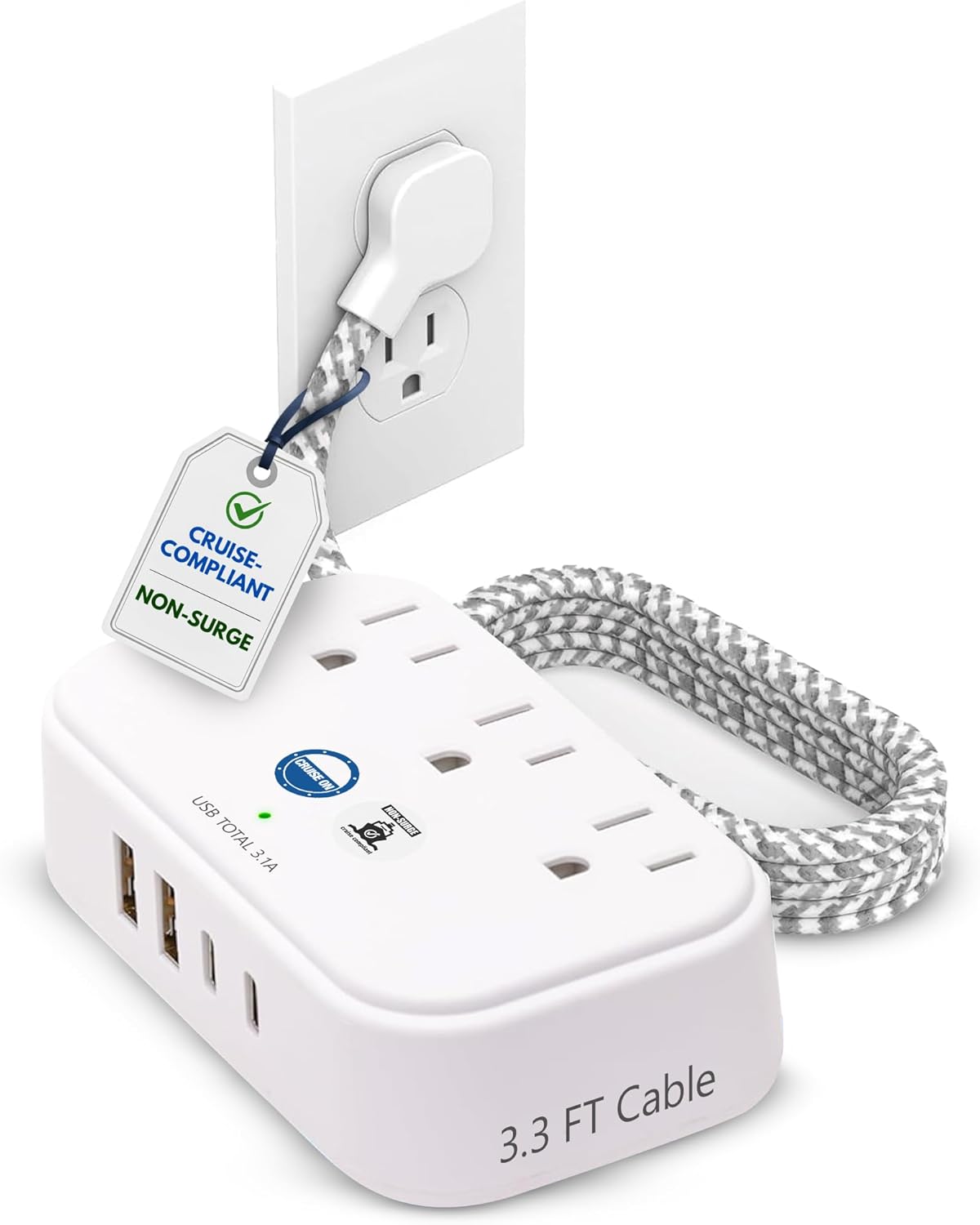
This Cruise Approved Power Strip (Non-Surge) with a 3.3 ft cord, 3 AC outlets, and four USB ports (2 USB-A + 2 USB-C) is designed to solve that exact problem—without triggering the “surge protector” rule that many cruise lines enforce.
I like products like this because they’re not glamorous, but they can dramatically improve day-to-day convenience. The key is whether it’s built and configured in a way that actually works in a cramped cabin, with modern devices, under cruise line restrictions.
🛒 Check Current Price on Amazon →
What this power strip is (and why “non-surge” matters on cruises)
The headline feature here is “non surge protector”. That wording is important. Many major cruise lines restrict or outright ban surge protectors because surge suppression circuits can interfere with ship electrical systems (and because cruise lines want to limit certain risk factors in cabins). The practical reality is:
- Simple outlet multipliers / non-surge power strips are often allowed.
- Surge protectors are commonly confiscated at embarkation if found in luggage screening.
This product is positioned as a cruise-friendly alternative: it expands one cabin outlet into multiple charging options without surge suppression. That’s the right idea—and it’s why this category exists at all.
Important caveat: cruise policies can vary by line, ship, and even port security staff. “Cruise approved” is not a legal guarantee. But if you’re shopping specifically to avoid the surge-protector issue, a non-surge model like this is the correct direction.
Core features that matter in real cabin use
Let’s break down what you’re actually getting and why each piece matters onboard.
1) Outlet and USB layout: 3 AC + 4 USB is the sweet spot
For most travelers, 3 AC outlets is enough to cover the “odd” items that still need a plug—think a camera charger, a laptop brick, a travel fan, a hair styling tool (where allowed), or a medical device that requires AC.
The bigger win is the USB mix: 2 USB-A for older cables and accessories, plus 2 USB-C for modern phones, tablets, earbuds, and power banks. In 2026, USB-C isn’t “nice to have”—it’s the default for a lot of gear. I consider dual USB-C a meaningful upgrade over older cruise strips that only include USB-A.
In a cabin, this setup lets you do something that feels surprisingly luxurious: charge multiple personal devices overnight without a pile of wall warts. That reduces clutter, frees up your limited outlets, and makes the nightstand area less of a cable disaster.
2) 3.3 ft cord: short enough to be tidy, long enough to be usable
The included 3.3 ft (about 1 meter) extension cord is a practical length for cruise cabins. Most of the time, you’re not trying to run power across the room—you’re trying to get power from a weirdly placed outlet to the desk or nightstand, or at least somewhere you can access without crawling behind furniture.
In my experience, super-long cords can become a tripping hazard in tight quarters. A shorter cord keeps things neater and reduces the chance of snagging it with a suitcase wheel or a bare foot at 2 a.m. That said, if your ship’s outlet is in an especially awkward spot (behind the bed frame, under a vanity, etc.), 3.3 ft can still feel limiting. It’s a compromise—but a reasonable one for most cabins.
3) Non-surge design: good for compliance, not for protection
Here’s the tradeoff you should be clear about: non-surge means you are not getting surge protection. That’s not a flaw—it’s the whole point for cruise compliance—but it does change how I recommend using it.
- On a ship: I’m fine using non-surge strips because you’re optimizing for policy compliance and convenience.
- At home or in hotels: if you’re protecting expensive electronics in a storm-prone area, I’d rather you use a quality surge protector (when allowed).
Think of this product as a charging and outlet expansion tool, not an electrical safety device.
Charging performance: what to expect (and what not to)
Most travelers care about one thing: Will it charge my stuff fast enough?
With multi-USB travel strips, the most common disappointment is expecting laptop-class USB-C Power Delivery (PD) charging. Many compact cruise strips with USB-C ports provide USB-C convenience, but not necessarily high-wattage PD output.
Because Amazon listings and revisions can vary, I recommend you verify the exact USB-C output (watts/amps) shown on the product page and/or printed on the unit itself once it arrives. In general, here’s how products in this category tend to behave:
- Phones and earbuds: usually fine. Even “basic” USB output will charge overnight easily.
- Tablets and power banks: typically okay, but may not be “fast charge” depending on total output and port sharing.
- Laptops: often not ideal unless the USB-C ports explicitly support higher PD wattage (30W/45W/65W+). Many do not.
My practical advice: treat the USB ports as excellent for phones, watches, earbuds, and tablets, and plan to use an AC outlet for a laptop charger if you need reliable speed.
Port sharing and “why my phone charges slower”
Another reality with multi-USB hubs: the total available USB power is often shared across ports. If you plug in four devices at once—especially two tablets plus phones—you may see slower charging on at least one device.
That’s not necessarily a defect; it’s just how many compact multi-port chargers are engineered. The win is convenience, not maximum wattage per device.
Cabin ergonomics: does it actually fit and behave well onboard?
This is where a cruise power strip either earns its spot in your bag or becomes a “why did I pack this?” item.
It reduces the wall-wart mess
The biggest benefit I see is removing the need for multiple USB wall chargers. In a cabin with one accessible outlet, that matters. You plug this in once and suddenly you have a centralized charging station.
It’s easier to keep organized
I recommend setting it up in one “charging zone”—usually the desk/vanity area. Then run your device cables to that spot. It keeps the nightstand clear, reduces cable tangles, and makes it less likely you’ll forget a charger when you disembark.
It can help couples and families avoid outlet arguments
If you’ve traveled with a partner, you know the subtle nightly negotiation: “Can I borrow the outlet?” With three AC outlets plus four USB ports, you can usually keep everyone happy—especially if one person needs AC for a camera battery charger while the other is charging a phone and earbuds.
Pros and cons (the honest list)
Pros
- Cruise-friendly concept: Non-surge design is the right approach for many cruise lines that restrict surge protectors.
- Excellent port variety: 3 AC outlets plus 2 USB-A and 2 USB-C covers modern and older devices.
- Reduces clutter: Fewer wall adapters needed in a cabin with limited outlets.
- Practical cord length: 3.3 ft is usually enough to reach a desk/nightstand area without becoming a tripping hazard.
- Great “one item” solution: Particularly useful for couples or families sharing a cabin.
Cons
- No surge protection by design: Great for compliance, but don’t buy it expecting protection for expensive electronics.
- USB-C may not mean USB-C PD: Depending on the exact output specs, it may not fast-charge tablets or laptops the way a dedicated PD charger would.
- 3.3 ft won’t solve every outlet location: Some cabins have outlets in truly awkward spots; a longer cord can sometimes be more flexible (though less tidy).
- Policy variability: Even non-surge strips can be questioned by staff depending on enforcement and interpretation.
Who this is best for (and who should skip it)
Best for
1) Couples cruising with multiple devices
If you’re both charging phones, watches, earbuds, and maybe a tablet, this is one of those “why didn’t we do this sooner?” purchases.
2) Families in one cabin
Kids add devices fast: tablets, handheld games, headphones, power banks. Having a central charging station reduces chaos and keeps everything in one place.
3) Content creators and photo-heavy travelers
If you’re charging camera batteries and a phone gimbal while keeping your phone topped up, the extra AC outlets help a lot.
4) Anyone trying to pack lighter
With built-in USB-A and USB-C, you can leave some wall chargers at home and still charge everything overnight.
Skip it if…
1) You need true fast USB-C PD for a laptop
If your goal is to charge a MacBook/Windows laptop via USB-C quickly, you may be happier with a dedicated high-wattage USB-C PD charger (and then use this strip mainly for phones).
2) You want surge protection for home use
This is not a substitute for a real surge protector in a home office setup.
3) You’re cruising with very strict enforcement and want zero hassle
No product can guarantee you won’t get questioned. If you’re extremely risk-averse, consider a simple, clearly labeled non-surge outlet expander without a cord—though you’ll sacrifice flexibility and USB options.
Real-world cruise scenarios (how I’d use it onboard)
Scenario 1: The “one outlet by the desk” cabin
This is the most common setup I’ve seen. You plug the strip into the single accessible outlet, place the unit on the desk/vanity, and now everyone has a place to plug in. Phones go on USB-C/USB-A, camera charger on AC, and you still have an AC outlet left for a nightlight or laptop charger.
Scenario 2: The “outlet behind furniture” cabin
When the outlet is tucked behind a bed or nightstand, the cord matters. At 3.3 ft, you can often route it to the top of a desk or a reachable ledge. If the outlet is truly buried, you may still end up placing the strip closer to the floor. In that case, I recommend short cable ties or Velcro wraps to keep charging cables from becoming a spaghetti pile.
Scenario 3: The “we brought too many gadgets” cabin
If you’re traveling with a group and everyone has a phone, watch, earbuds, and a power bank, you’ll love having four USB ports built in. My tip: label your cables (or use distinct colors) so you don’t play the nightly game of “whose USB-C is this?”
Build quality and safety considerations (what I look for)
With any power accessory, I care about a few fundamentals:
- Firm plug fit: You want the wall plug to feel secure, not loose or wobbly.
- Port spacing: AC outlets should be spaced enough to accommodate chunkier chargers without blocking each other.
- Heat management: A good unit shouldn’t get excessively warm under normal phone/tablet charging loads.
- Clear labeling: Especially important for “non-surge” claims and electrical ratings.
In practice, most reputable travel strips handle phone/tablet charging without drama. Where people run into trouble is using high-draw appliances (hair tools, kettles, etc.) that are not suitable for cruise cabin circuits or are prohibited. My rule: use this for electronics and chargers, not for heating devices.
Buying advice: what to check before you commit
If you’re comparing a few cruise power strips, here’s what I’d verify on the product page and/or the device label:
- Non-surge confirmation: It should explicitly state no surge protection.
- Total USB output: Look for a total watt/amp rating so you know what happens when all ports are used.
- USB-C specs: If you care about fast charging, confirm whether the USB-C ports support PD and at what wattage.
- Cord length vs. your cabin habits: If you like charging on the nightstand, measure roughly how far that is from typical outlet locations.
- Return policy: If you’re cruising soon, buy early enough to test it at home and return it if it doesn’t meet expectations.
Value: is it worth the money?
In my opinion, this type of cruise strip is worth it if it replaces multiple items in your kit. If you can leave behind two wall chargers and an outlet splitter, the value becomes obvious—especially because it reduces cabin friction and keeps devices charged predictably.
Where the value drops is if you already travel with a premium multi-port USB-C PD charger and only need one extra outlet. In that case, you might not need a full strip with AC outlets and multiple USB ports.
But for the average cruiser—especially first-timers—this is one of those small purchases that has an outsized impact on comfort and convenience.
See Latest Reviews on Amazon →
Tips to get the most out of it on your next cruise
- Make one charging station: Put it at the desk/vanity and charge everything there to avoid cable clutter.
- Bring short cables: 1–3 ft cables keep the area neat and reduce tangles.
- Use AC for the “needy” devices: Laptops and larger tablets often charge better on their own AC bricks.
- Don’t overload with appliances: Stick to electronics charging—phones, cameras, tablets, watches, power banks.
- Pack it accessibly: If security wants to see it, you’ll want it easy to pull out rather than buried under clothing.
Final verdict
If you want a simple, cruise-friendly way to multiply a single cabin outlet into a workable charging setup, this non-surge cruise power strip is a smart buy. The combination of 3 AC outlets plus 2 USB-A and 2 USB-C ports fits how people actually travel in 2026—multiple USB devices, plus a couple of legacy chargers that still need AC.
I recommend it most for couples, families, and anyone bringing camera gear or multiple devices. Just go in with the right expectations: it’s about convenience and compliance, not surge protection, and USB-C ports don’t automatically mean high-wattage laptop charging unless the specs explicitly say so.
If that matches what you need, it’s one of those “pack it once, use it every trip” accessories that earns its spot in your cruise essentials list.