Echo Show 8 Review: Is It Worth It in 2026?
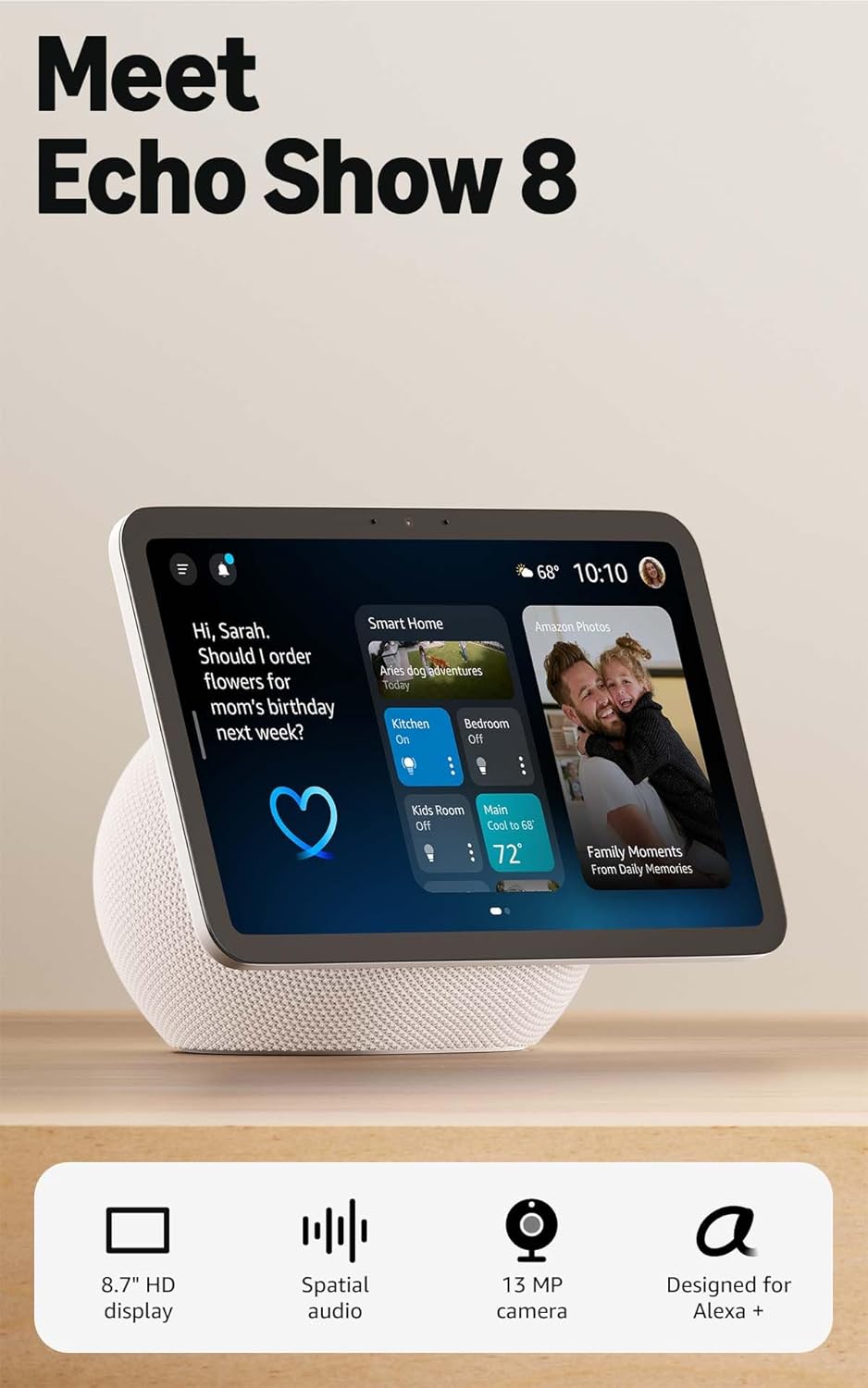
Amazon Echo Show 8 review (8.7-inch): what you’re really buying
If you’ve been eyeing a smart display for the kitchen counter, your desk, or a nightstand, the Amazon Echo Show 8 is one of the most “makes sense” options Amazon sells. It’s not the cheapest Echo Show, and it’s not the biggest either—but in day-to-day use, this is often the model that feels the most balanced: a screen large enough to comfortably read from across the room, speakers that can actually fill a space, and Alexa features that go beyond basic “set a timer” commands.
In this review, I’m focusing on what matters for real buyers: screen usability, speaker performance, voice recognition, smart home control, video calling, privacy, and long-term value. I’ll also be blunt about the stuff that annoys people about Echo Shows (yes, including the on-screen content and how “busy” it can feel), because that’s usually the deciding factor for folks on the fence.
🛒 Check Current Price on Amazon →
Quick specs and key features (the stuff you’ll notice daily)
Amazon markets this model around its HD 8.7-inch display and “vibrant” visuals—and while marketing language is always a little fluffy, the practical idea is simple: this is the size where a smart display becomes genuinely useful for recipes, calendars, camera feeds, and video calls without taking over your counter.
Here are the features that most impact the experience:
- 8.7-inch HD touchscreen designed for at-a-glance info and hands-free use
- Alexa voice assistant with routines, timers, reminders, and smart home control
- Built-in camera for video calling and Drop In (depending on your settings)
- Integrated speaker system that’s typically a noticeable step up from the smallest Echo Shows
- Privacy controls including a physical camera shutter and microphone mute button
- Streaming and visual content (news, weather, music lyrics, compatible video services, photo frames)
On paper, that sounds like “a tablet that doesn’t leave the charging dock.” In practice, it’s more like a voice-first home hub that happens to have a screen—and that distinction matters. If you want a do-everything touchscreen device with full app freedom, a tablet still wins. If you want something your household can use without thinking (timers, weather, music, cameras, calling), the Echo Show format is often the better fit.
Design and build: counter-friendly and family-proof
The Echo Show 8 is sized to fit where smart displays actually live: kitchen counters, side tables, shelves, and desks. It’s big enough to be readable from several feet away, but not so big that it feels like you installed a TV next to your coffee maker. That middle ground is exactly why I tend to recommend this size first for most homes.
The screen angle and base are designed for stability—important in a kitchen where you might tap the screen with wet hands or brush it while cooking. Touch response is generally snappy for the kinds of interactions you’ll do: pausing music, dismissing timers, swiping through cards, or pulling up a camera feed.
One usability tip: If you’re putting this in a kitchen, place it where it can “see” you while you cook (line-of-sight to your typical prep area). The better the microphone pickup, the less you’ll find yourself repeating “Alexa” over the blender.
Display quality: why 8.7 inches is the sweet spot
Smart displays live or die by “glanceability.” If you need to walk up close to read the weather, see who’s at the door, or follow recipe steps, the screen might as well not exist. This is where the Echo Show 8’s size pays off.
For recipes: You can keep a step visible while your hands are busy. The screen is large enough to read ingredient lists without squinting, and the touch targets are big enough that you’re not constantly mis-tapping like you can on smaller displays.
For calendars and reminders: The Show 8 makes it genuinely easy to see upcoming events at a glance. If you’re the kind of person who benefits from visual prompts (I am), this can be more effective than audio reminders alone—especially in a shared household.
For camera feeds: This is one of the most underrated reasons to buy a Show. If you have a video doorbell or indoor cameras, pulling up a live feed on the Show 8 is fast and practical. On a smaller screen, it’s “nice to have.” On this size, it becomes something you’ll actually use.
Is it a cinema screen? No. But for casual video, quick news clips, and “watch while cooking” content, it’s comfortably usable. The key is that it’s built for ambient, shared spaces, not for solo binge-watching in bed.
Speaker performance: better than you’d expect (and the real reason to upgrade)
Most people think they’re paying for the screen. In my experience, the speaker upgrade is often the bigger quality-of-life improvement when moving up from the smallest Echo Show models.
Music playback: The Echo Show 8 can serve as a legitimate kitchen or office speaker. It’s not going to replace a dedicated hi-fi setup, but it’s strong enough that you won’t feel compelled to immediately pair it with something else. Vocals tend to come through clearly, and it can handle background music volume without sounding thin.
Podcasts and voice content: This is where it shines. Spoken audio is easy to understand, even from across the room. If your main use is news briefings, podcasts during breakfast, or listening to audiobooks while you clean, the Show 8 is a comfortable daily companion.
Video calls: Better speakers also mean calls are easier to hear without cranking volume. That sounds minor until you’ve tried to talk to family over a small, tinny smart display—then it becomes the deciding factor.
If you’re buying this primarily for audio, there are Echo speakers that may offer better music value per dollar. But if you want audio + screen + smart home in one device, the Show 8’s sound is a meaningful step up from entry-level options.
Alexa performance: voice recognition and everyday reliability
In a smart display, Alexa needs to be reliable from a few feet away, sometimes in noisy rooms. In normal household conditions, the Echo Show 8 is typically responsive—especially for common tasks like:
- Timers and alarms (the #1 kitchen use case)
- Unit conversions (tablespoons to cups, ounces to grams, etc.)
- Weather and commute checks
- Shopping lists and reminders
- Smart home voice control (lights, plugs, thermostats, scenes)
Where Echo Shows become truly useful is with routines. If you’ve never set one up, it’s basically a “one phrase triggers multiple actions” system. For example:
- “Alexa, good morning” → lights on, weather, calendar, start coffee plug
- “Alexa, cooking time” → set multiple timers, play a playlist, turn on under-cabinet lights
- “Alexa, bedtime” → lights off, lock doors (if compatible), set alarm, play white noise
If you’re the type who likes systems that reduce mental load, routines are the feature that makes an Echo Show feel like a household tool rather than a gadget.
Smart home controls: the “visual hub” advantage
Voice control is great—until you don’t remember the exact device name, or you have guests who feel awkward talking to a cylinder. The Echo Show 8’s biggest advantage over a screenless Echo is that it can function as a visual smart home dashboard.
In real use, that means:
- Tap-to-control lights instead of shouting across the room
- See camera thumbnails and choose which feed to open
- Check device states (is that light on? is the plug off?)
If you’re building a smart home slowly, the Show 8 can be a central “control point” that’s always available. I especially like it for households with multiple people—because not everyone wants to install apps or learn device names.
Video calling and Drop In: useful, but set your privacy boundaries
The built-in camera makes the Echo Show 8 a solid device for hands-free video calls. If you have family members who also use Echo Shows (or the Alexa app), it’s a low-friction way to check in—particularly for older relatives who don’t want to fuss with phones and tablets.
Drop In is the feature that can feel magical or creepy depending on your setup. It allows permitted contacts/devices to connect quickly (like an intercom). For families, it can be fantastic for quick “dinner’s ready” announcements or checking on kids. For privacy-minded users, it’s something to configure carefully—or disable entirely.
What I like is that Amazon includes physical privacy controls that don’t rely on software trust:
- Camera shutter to physically block the lens
- Microphone mute button for instant voice privacy
If you’re putting the Show 8 in a bedroom or home office, I strongly recommend using the shutter when you’re not actively calling. It’s a simple habit that makes the device feel less “always watching,” even if you trust Amazon’s settings.
Kitchen use: where the Echo Show 8 earns its keep
If you told me you’re buying this for the kitchen, I’d say you’re probably the ideal buyer. The Show 8 is genuinely good at the “kitchen trio”:
- Multiple timers you can name (e.g., “pasta timer,” “oven timer”)
- Recipe guidance with on-screen steps
- Music, radio, and podcasts that are easy to control while your hands are messy
And because it has a screen, you get the small-but-important wins: you can see the timer countdown without asking, glance at the weather while packing lunches, or pull up a camera feed if someone rings the doorbell while you’re mid-chop.
The biggest “kitchen reality” issue is that smart displays can become cluttered with cards and suggestions. You can reduce this by going into settings and turning off content categories you don’t want. It’s worth doing once—it makes the device feel calmer and more like a purposeful appliance.
Nightstand and bedroom use: good, with a couple caveats
The Echo Show 8 can work well on a nightstand if you want:
- Alarms you can set by voice
- White noise / sleep sounds
- Smart light control from bed
- Quick weather and calendar in the morning
My caveat is simple: a screen in the bedroom isn’t for everyone. If you’re sensitive to light or you want a “no screens at night” rule, you’ll need to configure the display behavior (brightness, night mode, what content appears). The physical camera shutter is also a must for many people in a bedroom setting.
If your bedroom needs are minimal, a smaller Echo device may be more appropriate. But if you do want video calling, a bigger clock view, and more readable info from bed, the Show 8 is the size where it stops feeling cramped.
Home office use: underrated for calendars, focus, and quick controls
In a home office, the Echo Show 8 is surprisingly helpful if you lean into “assistant” tasks:
- Meeting reminders and at-a-glance schedule
- Quick timers for focus sessions
- Hands-free music control while working
- Smart home controls (lights, thermostat) without breaking concentration
Where it’s less compelling is if you want a work tool for deep app integration. This is not a tablet replacement. Think of it as a desk companion that reduces small friction points throughout the day.
The software experience: the biggest reason people return Echo Shows
Let’s talk about the elephant in the room: Echo Show software can feel busy. Amazon wants the home screen to be dynamic—rotating content, suggestions, prompts, and cards. Some people love that it’s “alive.” Others just want a clean clock, weather, and timers without extra noise.
In my experience, whether you’ll enjoy the Echo Show 8 long-term depends on how willing you are to spend 10–15 minutes tuning it:
- Disable content categories you don’t want (news cards, suggestions, etc.)
- Adjust rotation and home content settings
- Set photo frame preferences if you want it to behave like a digital frame
- Configure notification behavior so it’s helpful, not distracting
Once you do that, the Show 8 becomes much more “appliance-like.” If you never do it, it can feel like it’s constantly trying to get your attention. I’m not going to pretend that’s a non-issue—it’s a real part of the ownership experience.
Privacy and security: what I like, what I want you to check
Any always-on voice assistant raises reasonable privacy questions. The Echo Show 8 does a few things right from a consumer standpoint:
- Physical mic mute (instant, obvious)
- Physical camera shutter (not just a software toggle)
- Clearer household boundaries when you set up profiles, calling permissions, and Drop In rules
My practical advice is to treat privacy as a setup task, not a vague concern:
- Review Drop In settings and restrict it to your own devices (or disable it).
- Decide where the camera is acceptable—kitchen and living room are common; bedrooms are personal.
- Use the shutter when you’re not calling. It’s the simplest peace-of-mind win.
If you’re extremely privacy-sensitive and don’t want microphones in your home, no Echo device will be a comfortable fit. But if you’re okay with voice assistants and want strong physical controls, the Show 8 is better than devices that rely solely on software toggles.
Pros and cons (the honest list)
Pros
- Great “middle size” display that’s actually readable across a room
- Better speaker performance than entry-level smart displays, especially for voice and casual music
- Excellent kitchen utility (timers, recipes, music, quick info)
- Visual smart home control is easier for families and guests than pure voice control
- Physical privacy controls (camera shutter + mic mute) are a big trust builder
- Video calls are simple and accessible for non-techy users
Cons
- The home screen can feel cluttered unless you customize content settings
- Not a tablet replacement—you’re limited to Amazon’s ecosystem and supported apps/features
- Best experience often assumes you’re “all-in” on Alexa (or at least comfortable using it daily)
- Privacy requires intentional setup if you use calling/Drop In features
Who the Echo Show 8 is best for (and who should skip it)
Buy the Echo Show 8 if you need:
- A kitchen smart display for timers, recipes, music, and quick info
- A family-friendly smart home hub with tap controls and camera viewing
- A video calling device that’s easier than a tablet for older relatives
- A desk companion for reminders, calendar glances, and smart controls
- A single device that’s better than “cheap” models without going huge
Consider something else if:
- You want a minimalist display with almost no rotating content or suggestions (you may find Echo Show UI annoying)
- You need full app freedom (a tablet will be more flexible)
- You’re deeply invested in a different assistant ecosystem and don’t want to mix platforms
- You only need a basic alarm clock and occasional voice commands (a simpler Echo might be better value)
Value assessment: is it worth the money?
Value depends on whether you’ll use the Show 8 as a multi-purpose household device or just a novelty. If you’re going to use it for timers, music, smart home control, and at least occasional calling or camera viewing, it tends to earn its keep quickly because it replaces a bunch of small annoyances throughout the day.
If you’re only going to ask for the weather once in a while, it’s harder to justify versus cheaper Echo options. The Show 8 is at its best when it becomes part of your routine: morning briefings, cooking help, family reminders, and quick smart home interactions.
My general buying advice: the Echo Show 8 is usually the best “first serious smart display” for most households. It’s the model that feels like an upgrade without demanding you rearrange your life (or your countertops) around it.
Buying advice: how to decide in 60 seconds
- If you want the best kitchen experience: get the Echo Show 8. The screen size + sound is the right combo.
- If you want the cheapest way to try a smart display: you may prefer a smaller model first, but expect compromises in readability and audio.
- If you want a “living room centerpiece” display: consider a larger screen size, especially if you’ll watch more video.
- If you care about privacy: plan to use the shutter and tailor Drop In permissions on day one.
🛒 See Latest Reviews on Amazon →
My bottom line
The Amazon Echo Show 8 is the Echo Show I’d steer most people toward if they want a smart display that won’t feel like a compromise. The 8.7-inch screen is genuinely useful, the speakers are strong enough to make it a real music/podcast device, and the combination of voice + touch makes smart home control easier for everyone in the house.
The main drawback isn’t hardware—it’s the software vibe. If you want a super-clean, always-quiet interface, you’ll need to spend a little time adjusting settings. Do that, and the Show 8 becomes what it should be: a helpful home companion that saves time, reduces friction, and makes everyday routines smoother.
If you need a kitchen-friendly smart display with solid sound and a screen you can actually read, the Echo Show 8 is an easy recommendation.