Glow Roku Remote Case Review: Worth It in 2026?
Quick take: a small accessory that solves a real Roku problem
If you’ve owned a Roku for more than a week, you already know the remote is the weak link—not because it’s bad, but because it’s easy to lose, easy to slide between cushions, and easy to drop. A silicone sleeve like the (2PC) Cover-Case-for-Roku-Remote, Glow-in-The-Dark Silicone Protective Sleeve Skin is the kind of “why didn’t I do this sooner?” purchase—if it fits your remote properly and doesn’t ruin the button feel.
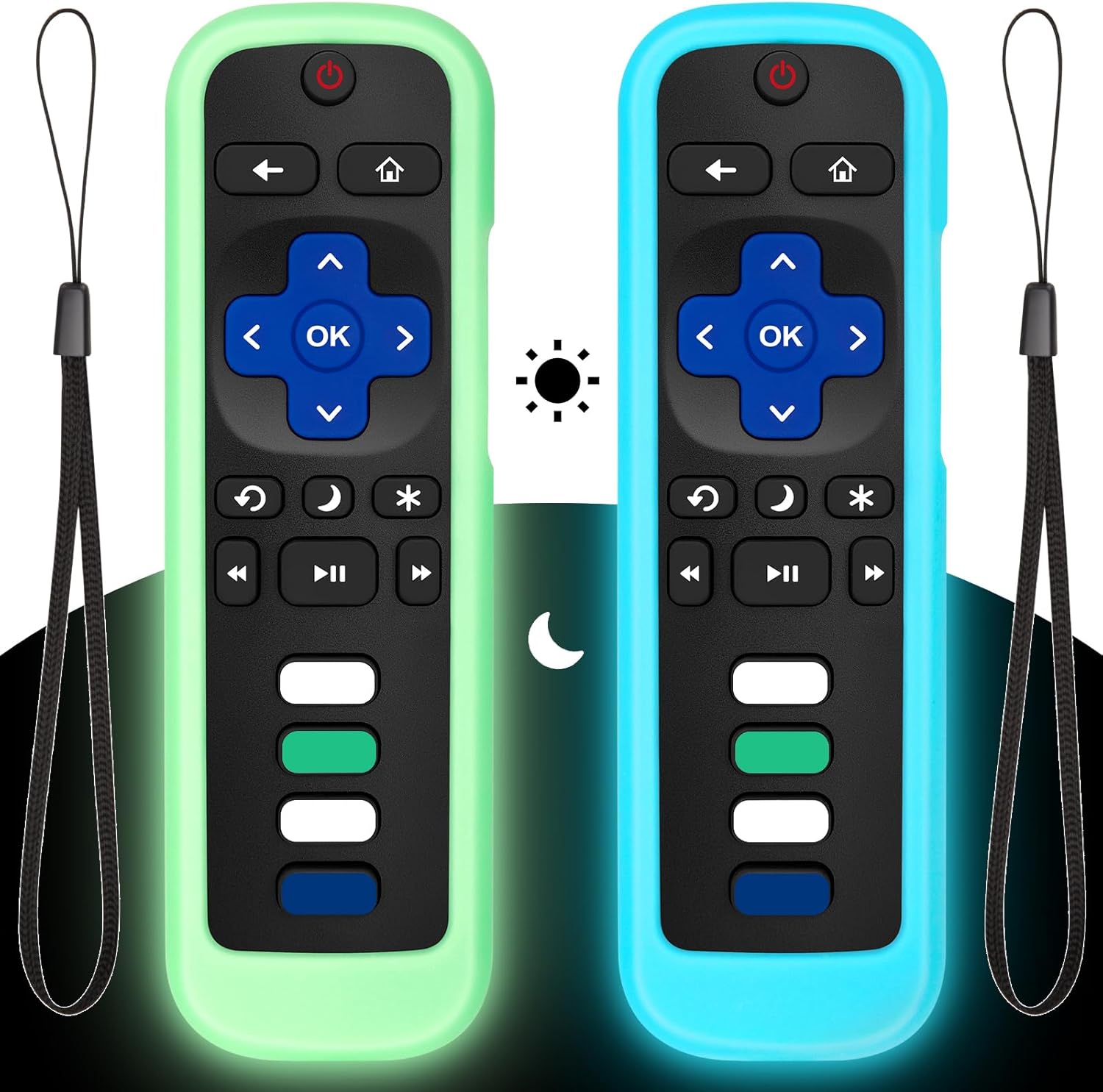
This particular listing is a 2-pack with glow-in-the-dark silicone sleeves (green/blue). The promise is simple: better grip, a bit of drop protection, and a remote you can find in a dark room. In practice, it mostly delivers—with a few important caveats about glow expectations and compatibility.
🛒 Check Current Price on Amazon →
What you’re actually buying (and what you’re not)
Let’s ground expectations. This product is a silicone protective sleeve for certain Roku remotes. It’s not a hard shell case, it’s not waterproofing, and it’s not a magical “never lose your remote again” device. What it can do well:
- Add friction and grip so the remote doesn’t slide off a couch arm or coffee table as easily.
- Make the remote easier to spot (bright colors + glow effect).
- Provide minor drop protection by adding a bit of shock absorption and edge padding.
- Make the remote feel thicker, which many people prefer—especially if you have larger hands.
What it won’t do:
- Prevent all damage from serious drops (stairs, tile, etc.). Silicone helps, but it’s not armor.
- Glow like a flashlight. Glow-in-the-dark silicone is subtle and fades over time.
- Guarantee compatibility with every Roku remote variant. Roku has multiple remote shapes and button layouts.
Fit and compatibility: the #1 thing to verify before you buy
Roku remotes are deceptively confusing because “Roku remote” can mean several different models with different button layouts, microphone/voice buttons, headphone jack (on some), and overall dimensions. A silicone sleeve must match the exact remote shape and button cutouts to be a good experience.
Here’s my practical advice: compare your remote’s front face to the product photos on the listing. Look specifically at:
- Button cluster layout (direction pad, back/home buttons, playback controls)
- Any voice/mic button placement
- Side buttons (some remotes have volume/power on the side; some don’t)
- Top power button shape and position
If the cutouts align, you’re in good shape. If they don’t, you’ll end up with a case that either blocks buttons, makes them mushy, or forces you to press at odd angles. With remote covers, fit is everything—even more than the glow feature.
Build quality and material feel: soft silicone done the right way
The sleeves are made from a typical consumer-grade silicone: flexible, slightly tacky, and comfortable in the hand. The “tackiness” is what you want here—it’s what helps the remote stay put on fabric couches and reduces that annoying “remote skating” across smooth surfaces.
In real use, silicone covers tend to fall into two camps: too slippery (feels like cheap rubber) or too sticky (collects lint like a magnet). This one lands closer to the “grippy” side. That’s a win for usability, but it comes with a trade-off: lint and dust will show up more than on bare plastic, especially if you have pets or a fuzzy throw blanket lifestyle.
The good news is it’s easy to clean. A damp cloth works, and you can rinse silicone quickly if it gets grimy. Just make sure the remote itself stays dry—remove it before doing anything more than a wipe-down.
Button feel and daily usability: does the cover ruin the remote?
This is the make-or-break part of any remote sleeve. A good case adds grip without making you feel like you’re typing through a winter glove.
Assuming you have a compatible remote, the button experience is generally positive because most Roku remotes use fairly tall, clicky membrane buttons. A silicone sleeve usually adds a thin layer around the button openings, which can slightly change the “edge feel” when you press buttons quickly (especially the D-pad). But in normal viewing—pause, play, directional navigation, volume changes—it should remain comfortable.
Where silicone covers can get annoying is with:
- Side volume buttons if your remote has them—if the sleeve is a little thick there, you might need a firmer press.
- Dedicated app shortcut buttons (Netflix/Disney+/etc.)—these are often smaller and can feel slightly recessed through a sleeve.
- Battery door access—you’ll usually need to remove the sleeve to change batteries. That’s normal, but it’s worth expecting.
Overall, I consider the usability impact minor. If you’re the type who navigates Roku menus rapidly (lots of fast directional presses), you’ll notice the difference. If you’re a normal human who just wants to watch something, you’ll adapt in about a day.
The glow-in-the-dark feature: helpful, but don’t expect miracles
Glow-in-the-dark accessories are often oversold. Here’s the honest reality: the glow effect is real, but it’s not constant and it’s not ultra-bright all night without “charging.”
Glow material works by absorbing light and then slowly releasing it. In practice:
- After being in a well-lit room or near a lamp, the sleeve will glow more noticeably.
- After hours in darkness, the glow fades and becomes subtler.
- If your living room is extremely dark and the remote is buried face-down between cushions, glow won’t save you.
Where it does help is the most common scenario: you’re watching TV at night with low lighting and the remote is on the couch, coffee table, or bed. That’s when a gentle glow makes it easier to spot at a glance instead of doing the full “hands-and-knees cushion excavation.”
Also, the bright green/blue silicone is useful even when not glowing—color contrast helps you see it against dark furniture.
Protection and drop performance: what silicone can realistically do
A silicone sleeve is not a rugged case, but it does provide meaningful everyday protection for a Roku remote. Most remote damage happens from:
- Short drops off a couch or bed
- Being stepped on (yes, it happens)
- Getting wedged and flexed between furniture
Silicone helps in two ways: it adds a little cushioning and it reduces the chance of the remote slipping in the first place. It also protects the remote’s plastic body from scuffs and shiny wear spots.
That said, don’t treat it like a guarantee. If you drop a remote onto tile from standing height, you’re still relying on the remote’s internal build quality and luck. Silicone improves odds, it doesn’t make it indestructible.
Two-pack value: why I actually like the 2PC bundle
Remote covers are the kind of product where a 2-pack can be genuinely practical rather than a gimmick. Here are the real-world reasons a 2-pack makes sense:
- Multiple Roku devices in the same house (living room + bedroom).
- A spare remote (many households keep a backup or have an older Roku remote around).
- One for you, one for family—and the color difference can help prevent “remote confusion.”
- Replacement if one sleeve tears over time or gets lost during cleaning/moving.
If you only have one Roku remote and you’re certain you’ll never need a second, a single sleeve would be more cost-effective. But since many homes end up with more than one Roku device, I generally consider a 2-pack a smart buy—especially if the price difference is small.
What I like (pros)
- Better grip immediately: The remote is less likely to slip off furniture, and it’s more secure in-hand.
- Improved findability: Bright colors plus glow helps in dim rooms—exactly when people lose remotes most.
- Comfort upgrade: The sleeve makes the remote feel slightly thicker and softer, which many people prefer.
- Everyday protection: Helps with scuffs and minor drops, and reduces the chance of damage from sliding.
- 2-pack practicality: Great for multi-Roku homes or as a backup.
What I don’t like (cons)
- Compatibility can be confusing: Roku remote variants are real; if your cutouts don’t match, the experience suffers.
- Glow fades: It’s helpful, but it won’t stay bright all night without exposure to light.
- Can attract lint/dust: Grippy silicone tends to pick up fuzz, especially in pet homes.
- Battery changes usually require removal: Not difficult, but it’s an extra step to expect.
Who this is best for
This 2-pack glow silicone Roku remote cover is a great fit if:
- You regularly watch TV in a dim room and want an easier-to-find remote.
- Your remote constantly slips into couch cushions or falls off the armrest.
- You have kids, roommates, or guests who are rough on remotes.
- You have multiple Roku devices/remotes and want a consistent “protected” feel across them.
- You want a low-cost way to extend the life of a remote without buying replacements.
Who should skip it
- Anyone unsure about remote model compatibility and unwilling to compare photos carefully.
- Minimalists who hate any added bulk or texture and prefer bare remotes.
- People expecting a strong, always-on glow (that’s not how glow material works).
Buying advice: how to choose the right remote cover (and avoid returns)
If you’re shopping for a Roku remote sleeve, here’s the checklist I recommend using before you click buy:
- Match the button layout to the listing images (this matters more than “Roku TV/Stick/Player” wording).
- Check for side buttons and make sure the sleeve supports them if your remote uses them.
- Decide what you want most: grip, glow, or protection. Silicone is best for grip + minor protection.
- Consider your household: pets and blankets mean more lint; kids mean you’ll appreciate the added protection.
And if you’re on the fence about glow-in-the-dark specifically: I see it as a nice bonus, not the primary reason to buy. The grip and visibility are the real wins.
Value assessment: is it worth the money?
Accessories like this live and die on value. A Roku remote replacement can cost enough that protecting the one you have makes sense, especially if your household is hard on remotes. If this 2-pack is priced reasonably (as these usually are), it’s an easy “quality of life” upgrade.
The value is highest if you:
- Own more than one Roku remote (2-pack gets used fully)
- Frequently misplace the remote at night
- Have a slippery couch/blanket setup
The value is lower if you’re extremely careful with your remote and never lose it—though, honestly, those people are rare.
See Latest Reviews on Amazon →
Final verdict: a smart, low-cost Roku remote upgrade
If you want a simple way to make your Roku remote easier to hold, harder to lose, and a bit more protected from everyday drops, this glow-in-the-dark silicone sleeve 2-pack is a solid pick—as long as you confirm the cutouts match your exact remote.
I like it most for families, multi-Roku homes, and anyone who watches TV in low light. The glow effect is helpful (not magical), the grip improvement is immediate, and the 2-pack format makes practical sense more often than you’d think.
If you’re tired of playing “where’s the remote?” every night, this is one of the cheapest fixes that actually changes your day-to-day experience.