Roku Ultra (2024) Review: Worth It in 2026?
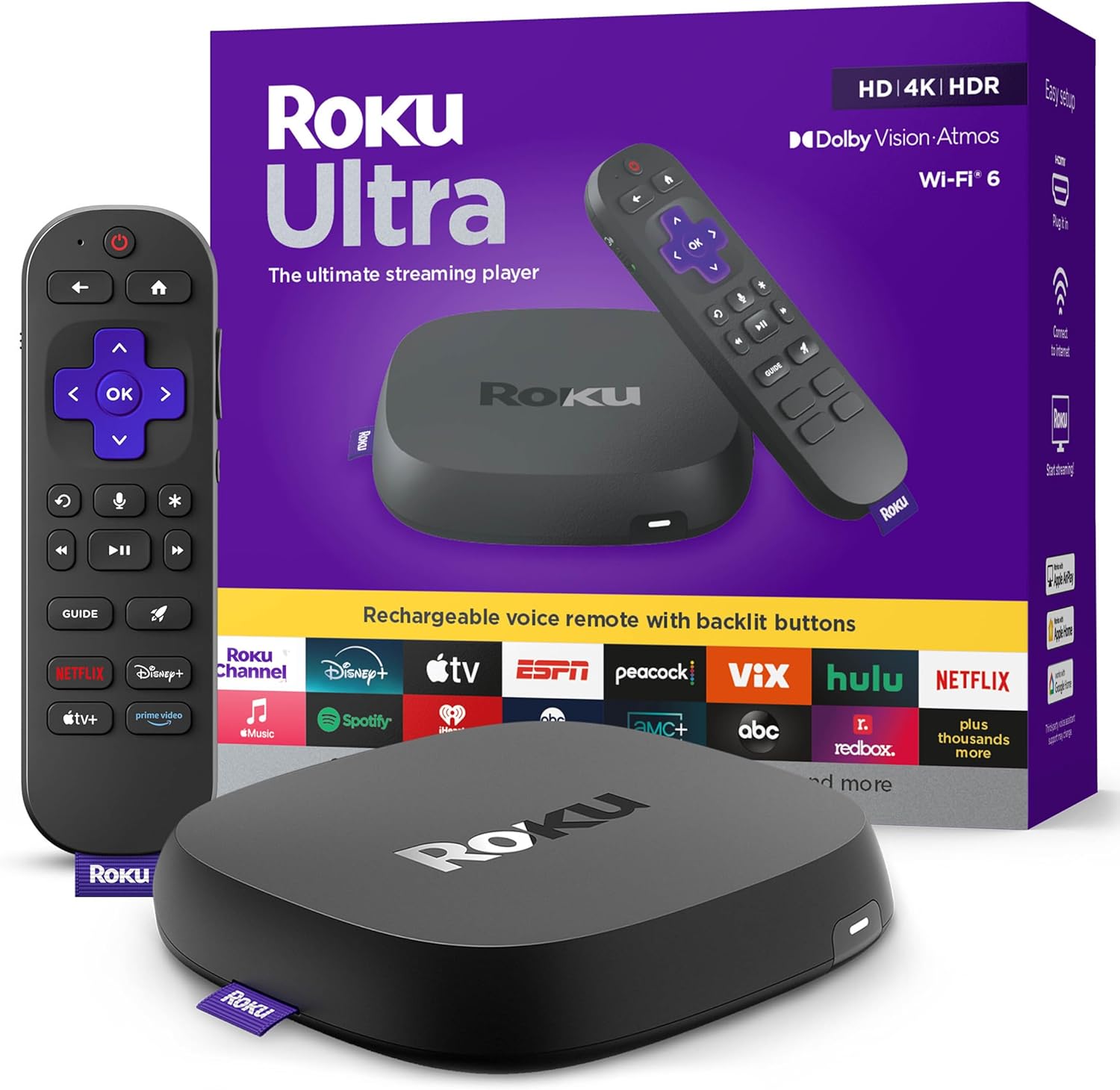
Roku Ultra (2024): what it is (and why it still matters)
If you just want streaming to work—fast, reliably, and without turning your TV’s home screen into a part-time job—the Roku Ultra (2024) is built for you. It’s Roku’s top mainstream streaming player: a small set-top box that connects to your TV via HDMI and handles all the heavy lifting for Netflix, Disney+, Max, Prime Video, YouTube, Apple TV, and the rest of the streaming universe.
In 2026, the “Do I even need a streaming box?” question is still valid because smart TV software is all over the place. Some TVs are quick and clean; many are slow, ad-heavy, or stop getting meaningful updates long before the panel itself is outdated. A dedicated player like the Roku Ultra can give an older TV a modern brain—or simply give a new TV a better one.
The 2024 Ultra’s headline upgrades are the ones I care about in real living rooms: Wi‑Fi 6 (stronger performance in congested homes), a rechargeable Voice Remote Pro with backlit buttons, and broad format support including 4K HDR10+ and Dolby Vision, plus Dolby Atmos pass-through for compatible apps and audio systems. Add in Ethernet for rock-solid wired streaming and you’ve got a box designed for people who hate buffering and love consistency.
🛒 Check Current Price on Amazon →
Key specs and features (the stuff that actually affects your experience)
Here are the features that matter most day-to-day, and how they translate into real usability.
- 4K streaming with HDR support: Supports major HDR formats including HDR10+ and Dolby Vision (plus HDR10). This is a big deal if you want the best picture on modern TVs without worrying about format mismatches.
- Dolby Atmos support: For compatible services/titles and a compatible AVR/soundbar, the Ultra can pass Atmos so you get immersive audio when it’s available.
- Wi‑Fi 6 + Ethernet: Wi‑Fi 6 helps in busy wireless environments; Ethernet is still the “set it and forget it” option if your router is within reach.
- Rechargeable Roku Voice Remote Pro: No more burning through AAA batteries. You also get backlit buttons (a bigger quality-of-life upgrade than it sounds), hands-free voice options, and Roku’s private listening via the Roku app (depending on your setup).
- Bluetooth: Useful for certain listening scenarios and device connectivity; in practice, most people will use it indirectly via Roku’s ecosystem and app features.
- Roku OS: Still one of the simplest, most consistent streaming interfaces. It’s not the flashiest; it’s the one most people can use without asking you for help every weekend.
Setup and first impressions
Roku has always been strong at setup, and the Ultra continues that trend. Connect HDMI to your TV, plug in power, connect to Wi‑Fi (or Ethernet), sign into your Roku account, and you’re off. If you’ve ever fought with a smart TV that insists on updating for 45 minutes before it will show you an input, Roku’s straightforward approach feels refreshing.
One thing I like about the Ultra form factor versus a stick: it’s typically more stable in the long run. Sticks can run hotter behind the TV, can be fussier about power (especially if you try to power them from the TV’s USB port), and can be annoying to access if you need to re-seat HDMI. The Ultra sits out in the open, stays accessible, and generally behaves like a proper set-top box.
The included remote is a major part of the “Ultra” experience. The backlit buttons are immediately useful in a dim room—exactly where most of us watch TV. And the fact that it’s rechargeable means one less household nuisance to manage.
Performance: speed, stability, and the “does it feel snappy?” factor
Most people don’t need benchmark numbers; you need a streamer that feels fast when you’re hopping between apps, scrubbing through a show, or waking the device up after it’s been idle. The Roku Ultra’s performance is what I’d call predictably quick. Menus are responsive, app launches are brisk, and general navigation doesn’t feel like you’re waiting on the device to catch up.
Where the Ultra separates itself from cheaper streamers is consistency. Budget sticks can be fine—until they aren’t. When storage is tight, when the OS gets heavier over time, or when the Wi‑Fi environment is noisy, you start seeing more hiccups: slower launches, occasional stutters, or the classic “why is this app suddenly buffering?” moment. The Ultra’s combination of stronger hardware, better connectivity options, and a more robust form factor tends to reduce those annoyances.
Wi‑Fi 6 is a practical upgrade if you live in an apartment building, have a mesh network, or have a house full of devices. It doesn’t magically make a slow internet plan fast, but it can improve efficiency and reduce congestion issues. And if you’re the type who just wants streaming to be bulletproof, the presence of Ethernet remains a huge advantage. Wired is still king for stability—especially for 4K HDR streams with high bitrates.
Picture quality: Dolby Vision and HDR10+ done the easy way
If your TV supports HDR, you want your streaming device to match it properly without you thinking about it. The Roku Ultra’s support for Dolby Vision and HDR10+ is one of the most compelling reasons to buy it instead of a cheaper Roku model.
Here’s why: streaming services and TV brands don’t all agree on one HDR format. Some TVs lean heavily into Dolby Vision, while others (notably certain Samsung models) emphasize HDR10+. When your streaming player supports both, you’re far less likely to end up stuck with basic HDR10 or SDR when a better option exists for your display.
In real viewing, Dolby Vision can deliver better scene-by-scene tone mapping on compatible TVs, helping highlights look punchy without crushing detail in darker areas. HDR10+ aims for a similar “dynamic metadata” benefit. The Ultra’s job is to get the right signal to your TV cleanly—and it does.
One caveat I always tell readers: your TV’s settings matter. If your TV is in a torch-mode Vivid preset, no streaming box can save you. But with a reasonable Movie/Cinema preset, the Ultra can absolutely be the difference between “streaming looks fine” and “streaming looks like what my TV was made for.”
Audio: Dolby Atmos support (and what to realistically expect)
Dolby Atmos is one of those features that people either don’t care about at all—or they care about it a lot. The Roku Ultra supports Dolby Atmos for compatible apps and titles when connected to an Atmos-capable soundbar or AVR (often via your TV’s eARC/ARC setup, depending on your gear).
What I like here is simply that the Ultra isn’t the bottleneck. If you’ve invested in a decent soundbar with upfiring drivers or a full AVR/speaker setup, you want your streaming box to pass the best audio track available. The Ultra is designed for that “I bought good audio, I want to use good audio” customer.
Just keep expectations grounded: Atmos availability depends on the streaming service, your subscription tier, the specific title, and sometimes even the app version. The Ultra can support Atmos, but it can’t force a service to give it to you.
The remote: rechargeable + backlit = everyday luxury
I’m picky about remotes because they’re the part you touch hundreds of times a week. The Voice Remote Pro included with the Roku Ultra is genuinely one of the best reasons to step up to this model.
Backlit buttons are the feature I wish every streamer included by default. If you watch TV at night, you’ll appreciate being able to find Volume, Play/Pause, and navigation without turning on a lamp or hitting the wrong button repeatedly.
Rechargeable is the other big win. In my experience, battery-powered remotes are never “expensive” to run, but they’re consistently annoying—especially if you don’t keep spare batteries around. A rechargeable remote is the kind of upgrade that quietly improves your life over the long term.
Voice control can be handy for quick searches and launching apps, though I still find that many people use voice in bursts: a lot for the first month, then only when they’re trying to find a specific title quickly. It’s nice to have, not the main reason to buy the Ultra.
Roku OS and app support: why Roku remains the safe pick
Roku’s interface isn’t trying to be a “content-first AI discovery engine.” It’s trying to get you into the app you want with minimal friction. For most households, that’s exactly the right priority.
App availability is excellent. The major services are here, and Roku’s platform maturity means fewer weird compatibility surprises. If you’re buying for a family member who just wants to watch their shows without learning a new UI every six months, Roku is still the brand I’m most comfortable recommending.
Free & Live TV is part of the Roku value proposition too. I treat it as a bonus rather than a primary reason to buy, but it can be genuinely useful if you want background channels, news, or casual viewing without another subscription.
Real-world usability: what it’s like to live with the Roku Ultra
Here’s the day-to-day experience in plain terms:
- It stays out of your way. You turn on the TV, hit Home, open your app, and watch. That sounds basic, but it’s exactly what many smart TV platforms complicate with extra layers.
- It’s great for multi-person households. Roku’s simplicity makes it easier for kids, guests, and less techy family members to use without constant help.
- It’s a strong “upgrade box” for older TVs. If your TV is still great but the built-in system is sluggish, the Ultra can make the whole setup feel new again.
- It plays nicely with better home networks. Wi‑Fi 6 and Ethernet give you options, which matters when you’re chasing stability more than anything else.
The Ultra is also one of the easiest ways to standardize the experience across multiple TVs. If your living room TV is one brand and your bedroom TV is another, using Roku on both keeps the interface consistent—so you’re not relearning everything every time you switch rooms.
Pros and cons (honest take)
Pros
- Excellent format support: 4K with Dolby Vision and HDR10+ support is a big win for compatibility across TV brands.
- Wi‑Fi 6 + Ethernet: Great for stability, especially in crowded Wi‑Fi environments or for users who can run wired.
- Rechargeable Voice Remote Pro: Backlit buttons are genuinely useful; rechargeable is a long-term quality-of-life upgrade.
- Roku OS is simple and reliable: Easy for families, guests, and anyone who doesn’t want a complicated interface.
- Strong overall responsiveness: Feels snappy in daily navigation and app switching.
Cons
- Costs more than basic streamers: If you only watch one or two apps in 1080p, it’s probably overkill.
- Atmos depends on your ecosystem: You need compatible apps, titles, and audio gear to benefit.
- Not the “power user tinkering” box: If you want deep customization, sideloading flexibility, or a gaming-centric device, other platforms may fit better.
Who the Roku Ultra is best for
I recommend the Roku Ultra most strongly for a few specific types of buyers:
- Home theater “normal people”: You want great picture and audio, but you don’t want to troubleshoot. Dolby Vision/HDR10+ + Atmos support makes this a strong centerpiece for a nice TV and soundbar setup.
- Anyone with unreliable streaming on built-in TV apps: If your smart TV is slow, crashes, or buffers more than it should, a dedicated streamer often fixes the experience instantly.
- Households that value an easy remote: Backlit buttons and rechargeability are huge for everyday comfort. If you watch at night, this matters.
- People who can use Ethernet: If you have a wired connection available, the Ultra is one of the simplest ways to get stable, high-quality 4K streams.
- Mixed-TV households: If you have different TV brands around the house, Roku keeps everything consistent.
Who should skip it (and what to buy instead)
The Ultra is not the right answer for everyone. Here’s when I’d tell you to save your money:
- You watch mostly in HD (1080p) and don’t care about HDR: A cheaper Roku model will get you the same core Roku experience for less.
- Your TV’s built-in platform is already excellent and fast: If you’re truly happy with your TV OS and it gets updates reliably, you might not need an external box.
- You want a niche feature set: Some buyers want a streamer primarily for gaming, advanced media server playback, or deep customization. Roku is more about mainstream streaming done well.
If your main goal is “Roku, but cheaper,” look at Roku’s sticks and midrange boxes. You’ll give up some performance headroom and premium remote features, but you may not miss them depending on your habits.
Buying advice: how to decide if it’s worth the money
When readers ask me whether the Roku Ultra is “worth it,” I usually flip the question: What’s the cost of annoyance?
If you stream daily and your current setup regularly wastes your time—slow app launches, buffering, Wi‑Fi drops, laggy menus—then paying more for the Ultra can be a smart value. You’re not just buying picture quality; you’re buying less friction.
On the other hand, if you’re outfitting a guest room TV that gets used twice a month, a premium box is harder to justify. In that case, a cheaper Roku is often the better value.
My general rule:
- Buy the Ultra for the main TV where you care about performance, HDR formats, and a great remote.
- Buy a cheaper Roku for secondary TVs where “good enough” is truly good enough.
Connectivity and placement tips (to get the best results)
If you want the Ultra to perform at its best, here are a few practical tips I’ve found helpful:
- Use Ethernet if you can. If your router or a network switch is near the TV, wired is the easiest way to eliminate many streaming problems.
- If you use Wi‑Fi, prioritize router placement. Wi‑Fi 6 helps, but it can’t overcome a router hidden in a metal cabinet across the house.
- Use a quality HDMI cable. You don’t need an overpriced cable, but a decent High Speed/Ultra High Speed HDMI cable from a reputable brand can prevent handshake weirdness with 4K HDR.
- Check your TV’s HDR settings. Some TVs require enabling enhanced HDMI format on the input to allow full HDR bandwidth.
My verdict: a premium Roku that earns its “Ultra” name
The Roku Ultra (2024) is the Roku I recommend when you want the best Roku experience without compromise. The combination of Wi‑Fi 6, Ethernet, Dolby Vision, HDR10+, and Dolby Atmos support makes it a strong match for modern 4K TVs and soundbars. And the rechargeable backlit remote is one of those upgrades you’ll appreciate every single night.
Is it the cheapest way to get Roku on your TV? Not even close. But for a primary living room setup—especially if you’re sensitive to buffering, lag, or remote frustration—I think it’s one of the most practical “pay once, enjoy every day” upgrades you can make.
🛒 Buy on Amazon – Check Price →
Quick recommendation checklist
- Get the Roku Ultra if you want the smoothest Roku, the best HDR compatibility (Dolby Vision + HDR10+), and a premium rechargeable backlit remote.
- Consider a cheaper Roku if this is a secondary TV, you don’t care about HDR formats, or you’re trying to minimize spend.
- Use Ethernet if you can—especially if your household streams a lot of 4K content.